
Managed Devices
View all devices inside of your organization that are linked via Intune.
Dashboard Overview

Inside the dashboard you can view:
- Total Devices: See the total devices in your organization linked to Intuneand Microsoft Entra and view the devices Operating Systems.
- Windows 11 Readiness: See the total number of devices assessed for Windows 11 readiness and their statuses:
- Already running Windows 11
- Compatible but not yet upgraded
- Not compatible with Windows 11
- Compatibility status unknown
- Windows 365 (Cloud PC): View the number of Cloud PCs currently in use and their utilization.
All Devices
View all of the devices in your organization linked via Intune.

- Name: The device name.
- Operating System: The current operating system in use on the device.
- Model: The model name for the device.
- User: The current user assigned to the device.
- Last Seen: The Time the device was last seen in Intune
Other Devices
View the other devices in your organization not currently active or managed by Intune

Upgradable Devices
View the current devices available for upgrade and the devices that have already been upgraded in your organization.

- Name: The device name.
- User: The current user assigned to the device.
- Model: The model name for the device.
- Requirement Checklist to Upgrade: The checklist to determine if the device meets the requirements to upgrade to Windows 11.

- Verdict: The final decision on whether the device can be upgraded to Windows 11.
Windows 365
View your organisations Cloud PC's
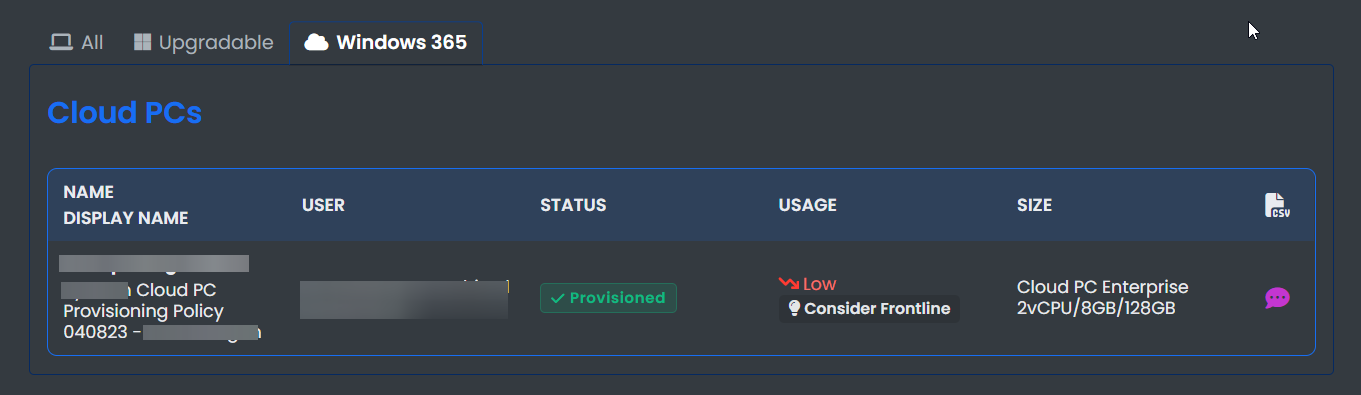
Here you can view:
- Name Display Name: The name and display name of the Cloud PC.
- User: The current user assigned to the Cloud PC.
- Status: The current status of the Cloud PC.
- Usage The current usage of the Cloud PC .
- Size: The current size specifications of the Cloud PC.